AdsPower proxy setup
Step-by-step guide to using Proxy302 proxies in AdsPower: where to paste host, port, username and password, which proxy to buy, partner offers and FAQ.
Eight antidetect browsers, one table: what the free plan gives you, which computers it runs on, and how a Proxy302 proxy goes in.
| Item | Free plan | Desktop apps | How the Proxy302 proxy goes in | Proxy302 article on its own site |
|---|---|---|---|---|
| AdsPower | 2 profiles, free indefinitely | Windows, macOS, Linux; iPhone app | Pick Proxy302 as the provider under Proxy → Configuration, or add a custom proxy | Yes, in Chinese |
| BitBrowser | 10 profiles, free permanently; up to 20 new profiles a day | Windows 10+, macOS 12+ | Paste host:port:username:password into the proxy host field | Yes, in Chinese |
| Dolphin {anty} | Up to 5 profiles, 1 user, 50 saved proxies, no API | Windows, macOS, Linux | New proxy: host:port:login:password with a socks5:// or http:// prefix | No; add it as New proxy |
| GoLogin | Up to 3 profiles | Windows, macOS, Linux | Your proxy: paste IP:port:username:password | No; GoLogin has a partner link for Proxy302 users |
| Kameleo | 2 browsers at a time, 300 minutes of browser time, 100 cloud profiles | Windows 10+, macOS 12+, Docker | Profile Edit: choose HTTP or SOCKS5, then host, port, username and password | Yes, in English |
| Hidemium | 5 profiles | Windows, macOS | Add Profile → Proxy → Your Proxy dialog | Yes, a blog post in English |
| GenLogin | 5 profiles | Windows, macOS | Network → Your Proxy (not GenProxy); paste host:port:username:password | Proxy302 is listed on its partner page |
| Huayang | Free long term for a team of 2 users and 2 profiles without cloud drive or RPA | Windows, macOS, Linux (Ubuntu 22+) | IP pool with the API link, username and password from the Proxy302 console | Yes, in Chinese |
Free plans and systems come from each browser's own pricing and download pages, checked on 18 October 2026; vendors change them, so confirm before you commit. The setup column condenses our setup page for each browser.
If you already manage your environments in these tools, you do not have to move. The Proxy302 client connects through their official local API. You state one goal, the AI carries it out in each environment in turn, and signing in, paying and publishing stay with you.
IPs, billing and support tickets are all in our own hands, so the client can do two more things: report an IP for repair when it stops working, and check before a window opens that the IP fits the site you are about to visit.
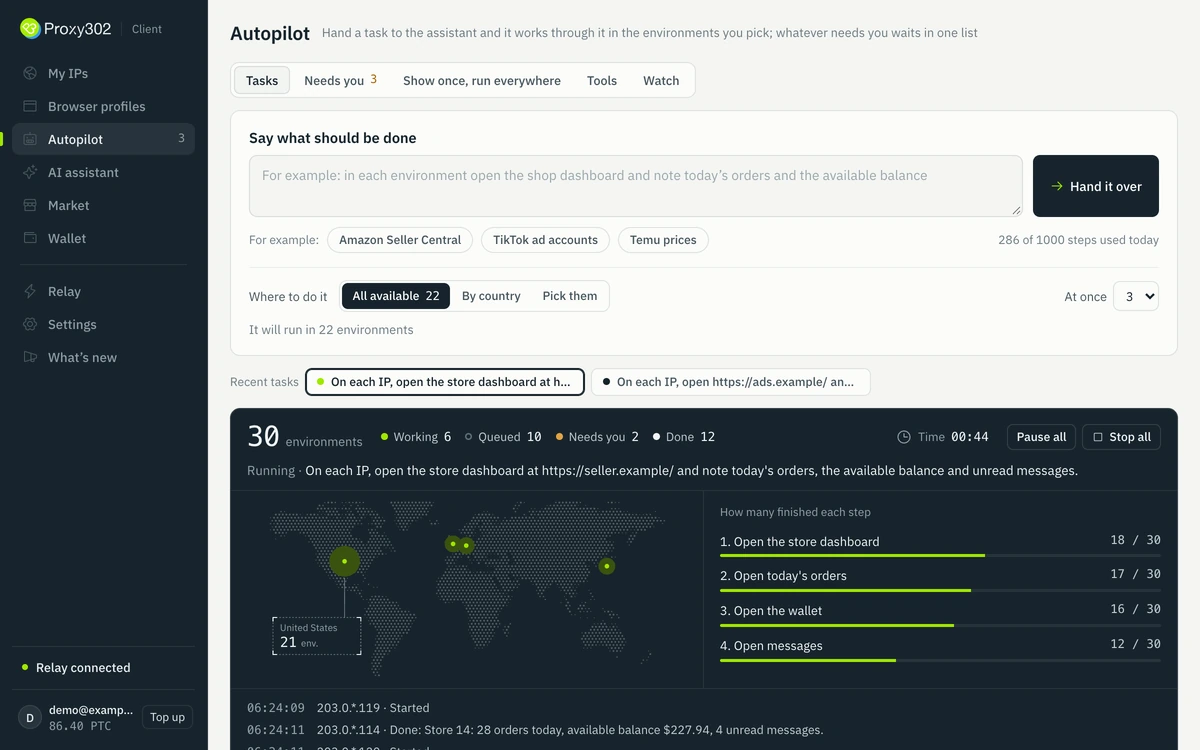
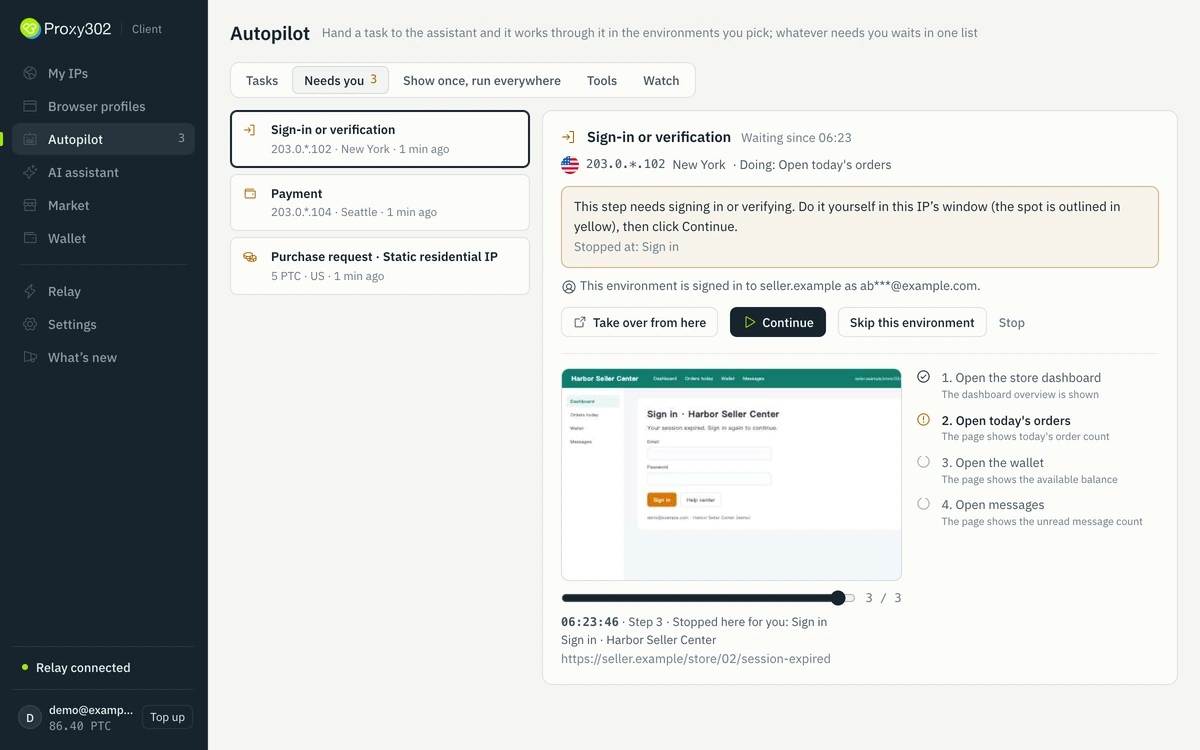
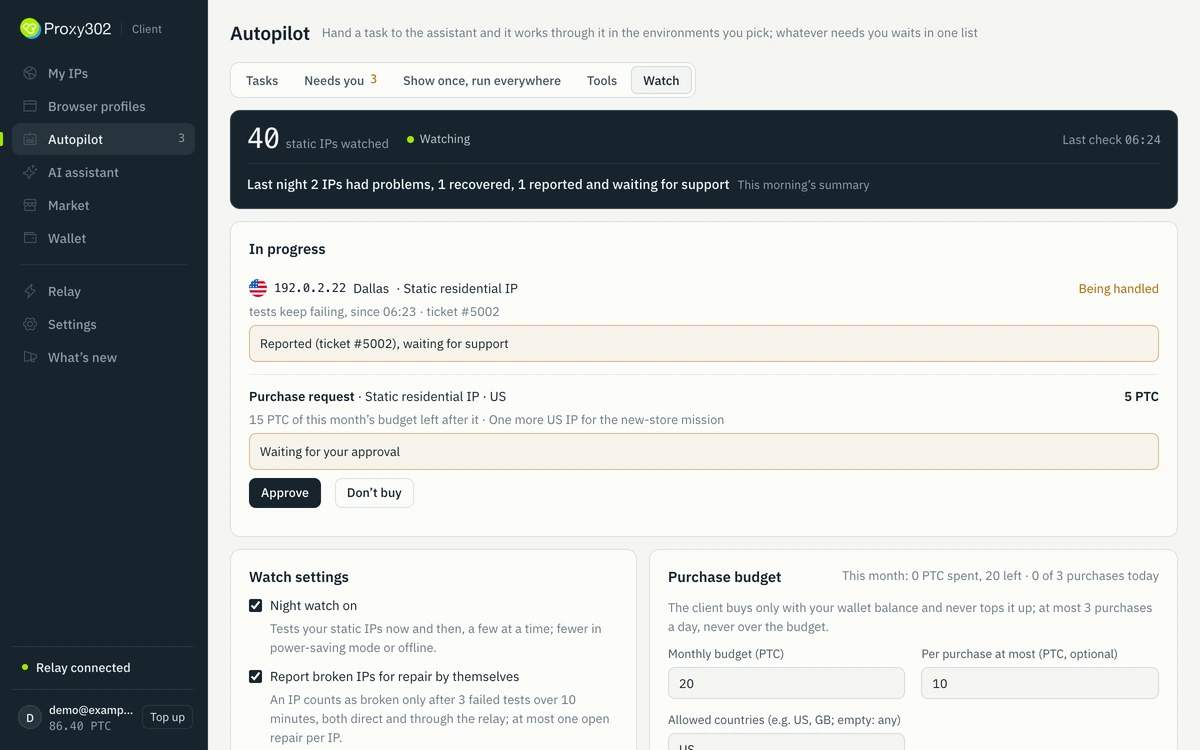
| Item | By hand | Your own scripts | Proxy302 Autopilot (beta) |
|---|---|---|---|
| Working across many environments | Open and click through them one at a time | Write once and run in bulk; rewrite whenever a page changes | State one goal; the AI works from what each page actually shows |
| When an IP stops working | You find out halfway through, then file a ticket | The script stops with an error and you look for the cause | The client notices and reports it for repair, with a one-line summary in the morning |
| Signing in, paying, publishing | You do it yourself | Often written into the script, with nothing to stop a mistake | It always stops and waits for you |
Autopilot is in beta and opens up gradually. Signing in, paying and publishing are always done by you.
| Item | Look at | Why |
|---|---|---|
| You want the most free profiles | BitBrowser | 10 profiles free permanently; Hidemium, GenLogin and Dolphin {anty} give 5 |
| You work on Linux | AdsPower, Dolphin {anty}, GoLogin or Huayang | Their download pages offer Linux builds |
| Your team reads Chinese | AdsPower, BitBrowser or Huayang | Each publishes a Chinese article on setting up Proxy302 |
| You control the browser from code | Kameleo | Its plan table gives the Free plan API access (60 requests a minute for live fingerprint data) and lists SDKs for Python, JavaScript and C#; Dolphin {anty} opens its API on paid plans. For the others, check their documentation |
| You already use one of them | Its setup page below | Each page shows where the four fields go and how to test them |
We do not rank the browsers: each suits different teams. Partner codes for AdsPower, BitBrowser and GenLogin are on their setup pages.
One static ISP IP for every profile that stays logged in. It is a home-broadband address that stays fixed for the lease and it never rotates, so the account keeps seeing the same IP. You choose SOCKS5 or HTTP when you buy and the IP keeps it; one order takes up to 100 IPs, one per profile, each charged separately.
Rotating residential proxies suit short research sessions on a sticky session; datacenter IPs suit tasks without logins. Auto-renew is optional and set per IP: switch it on in My assets (new purchases start with it off), or renew a static IP by hand there before its lease ends. Renewing normally keeps the same IP; if a residential IP is moved to another IP in the same country, update the profile.
A browser that keeps many separate profiles, each with its own cookies, storage, fingerprint settings and proxy, so several accounts can run from one computer without sharing a browser. AdsPower describes a profile as a unique set of browser settings such as user agent, IP address and Canvas fingerprint.
All eight have a free tier: AdsPower 2 profiles, GoLogin 3, Hidemium, GenLogin and Dolphin {anty} 5, BitBrowser 10, Huayang 2 for a two-person team, and Kameleo 300 minutes with 2 browsers at a time (checked 18 October 2026).
It depends on how many profiles you need, your operating system and your team. Use the table above to shortlist two, then try their free plans with one static ISP IP each.
Yes, if the accounts must stay separate: without one, every profile goes out through your own IP. Give each profile its own IP.
Yes, with any that accepts an HTTP or SOCKS5 proxy with a username and password.
Our setup guide covers the real causes: the proxy type, the login, and whether your network reaches the proxy.
No. Turn on the local API in their settings and paste the API key into the client. It then lists your environments and works inside them.
No. Signing in, paying and publishing always stop and wait for you, and any identity verification a platform asks for is also completed by you.
The feature already ships with client 3.4.0 and is in beta, not yet open to every account. Once it opens, "Autopilot" appears in the client's left sidebar. Watch the release notes inside the client for the date, or join the client user group at t.me/proxy302_client to be notified.
Step-by-step guide to using Proxy302 proxies in AdsPower: where to paste host, port, username and password, which proxy to buy, partner offers and FAQ.
Step-by-step guide to using Proxy302 proxies in BitBrowser: where to paste host, port, username and password, which proxy to buy, partner offers and FAQ.
Add a Proxy302 proxy in Dolphin {anty}: click New proxy in a profile, pick the protocol, paste one line and check it with the arrows.
Step-by-step guide to using Proxy302 proxies in GoLogin: where to paste host, port, username and password, which proxy to buy, partner offers and FAQ.
Step-by-step guide to using Proxy302 proxies in Kameleo: where to paste host, port, username and password, which proxy to buy, partner offers and FAQ.
Add a Proxy302 proxy to a Hidemium profile: Your Proxy tab, the four fields to fill in, Check Proxy, and which IP to buy.
Choose Your Proxy on GenLogin's Network tab, paste a Proxy302 IP and click Check Proxy. With docs screenshots and the discount code.
Import a Proxy302 static IP or rotating residential into Huayang with one pasted line. Includes the Hong Kong access point for users in mainland China and help-center screenshots.
Set up a proxy in AdsPower, BitBrowser, GoLogin, Kameleo, Hidemium or GenLogin: one IP per profile, where each field goes, and what a failed proxy check really means.
Incogniton, Octo Browser, MuLogin and Lalicat are antidetect browsers; GeeLark, DuoPlus and VMOS Cloud are cloud phones, where each phone gets its own network. Each page shows where the proxy fields go.
Add a Proxy302 IP in Incogniton's Proxy Library: paste the connection string, click Check, assign it to profiles. With screenshots.
Save a Proxy302 IP in the Octo Browser Proxy Manager, check it, then pick it in a profile. With screenshots.
Copy one line from Proxy302, paste it into GeeLark's Bulk add, check it, and give each cloud phone its own IP.
Step-by-step guide to using Proxy302 proxies in DuoPlus: where to paste host, port, username and password, which proxy to buy, partner offers and FAQ.
Add a Proxy302 IP in VMOS Cloud: Proxy IP, Add Proxy, fill in four values, Bind to a cloud phone. With screenshots.
Add a Proxy302 IP to a MuLogin profile: Basic Configuration, Proxy settings, pick the type, paste IP:Port:Username:Password, click Test proxy information, save.
Add a Proxy302 IP to a Lalicat profile: Add browser, Basic Configuration, Proxy settings, pick the type, fill in IP, port, account and password, click Check the Proxy, save.
| Item | Code | Offer |
|---|---|---|
| AdsPower | proxy302 | Up to 45% off |
| BitBrowser | 9BC6SANEIX | Up to 46% off |
| GenLogin | PROXY302 | 20% off |
| Incogniton | Proxy302 | 15% off your first payment |
Only these four have a published Proxy302 code; the other tools above have none. Terms are set by each partner and may change, so the offer on the partner's own page applies. The registration link with the code is on each setup page.
Official documentation · Confirmed on:
Read on 18 October 2026. Pricing: https://www.adspower.com/pricing · Download: https://www.adspower.com/download · Proxy302 article: https://help.adspower.net/docs/Proxy302-dai-li-pei-zhi
Official documentation · Confirmed on:
Read on 18 October 2026. Pricing: https://www.bitbrowser.net/price · Download: https://www.bitbrowser.net/download · Proxy302 article: https://doc2.bitbrowser.cn/help1/dailiip/ru-he-she-zhi-proxy302-dai-li.html
Official documentation · Confirmed on:
Read on 18 October 2026. Pricing: https://dolphin-anty.com/tarifs/ · Download: https://dolphin-anty.com/download/
Official documentation · Confirmed on:
Read on 18 October 2026. Pricing: https://gologin.com/pricing/ · Download: https://gologin.com/download/
Official documentation · Confirmed on:
Read on 18 October 2026. Pricing: https://kameleo.io/pricing · Download: https://kameleo.io/downloads · Proxy302 article: https://help.kameleo.io/article/112-using-kameleo-with-proxy302
Official documentation · Confirmed on:
Read on 18 October 2026. Pricing: https://hidemium.io/pricing/ · Download: https://hidemium.io/download/ · Proxy302 article: https://hidemium.io/blog/how-to-use-proxy302s-proxies-with-hidemium/
Official documentation · Confirmed on:
Read on 18 October 2026. Pricing: https://genlogin.com/pricing/ · Download: https://genlogin.com/download/
Official documentation · Confirmed on:
Read on 18 October 2026. Pricing: https://www.szdamai.com/price · Download: https://www.szdamai.com/download · Proxy302 article: https://www.szdamai.com/help/ip/pool-proxy302
Product observation · Confirmed on:
Our pages for AdsPower, BitBrowser, Dolphin {anty}, GoLogin, Kameleo, Hidemium, GenLogin and Huayang, each checked against the browser's own documentation on 18 October 2026; they also carry the partner codes.
Product observation · Confirmed on:
Product facts file of the site, checked on 18 October 2026: a static ISP IP is fixed and does not rotate during the lease, keeps the protocol chosen at purchase. Console source re-read on 22 October 2026: an order takes a Quantity of 1 to 100 IPs, each bought and charged separately. Since 24 October 2026 the console has an Auto-renew IP switch for static IPs (off for new purchases) on the purchase page and per IP in My assets.
Create an account, top up once, then pick rotating residential, static ISP or datacenter IPs and have one running in your browser within minutes.