ISP proxies (static residential)
Fixed static ISP proxies: a residential-grade IP that stays the same for the whole term. For social accounts, stores and AI tools. HTTP and SOCKS5.
View options and pricing ×
×
Copy the connection details from Proxy302, enter them in GoLogin, click Connect, and the profile goes online from its own IP.
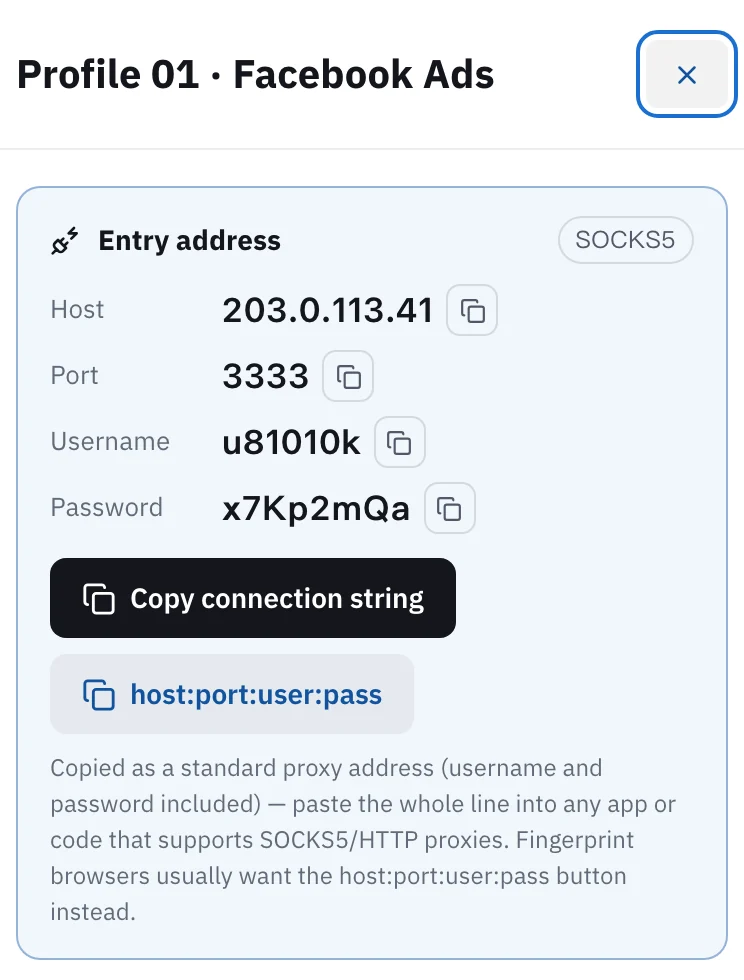
In Proxy302, open My assets and click the IP you want to see its host, port, username and password. In GoLogin, go to All profiles, click + in the profile’s Proxy & Location cell, then click the computer icon (Add my proxy) at the bottom of the pop-up. Fill in Host, Login and Password and click Connect. A green indicator means it works. If a profile stays signed in to the same account for months, give it its own static ISP IP.
Updated:
GoLogin runs each account in its own browser profile, with its own fingerprint. Without a proxy, every profile still goes online through your connection, so websites see the same IP behind all of them.
GoLogin’s docs put it plainly: give each profile a different proxy. Profiles that share one proxy are easier for websites to link together.
A profile’s proxy settings have three options: Gologin proxy (GoLogin’s built-in proxies), Your proxy (any third-party proxy) and Without proxy. Proxy302 IPs go under Your proxy. The steps below set up one static IP per profile.
Open My assets in the Proxy302 console and click the IP for this profile. The card lists the host, port, username and password, each with its own copy button. The protocol (HTTP or SOCKS5) sits in the top-right corner; you’ll need it in the next step.
On the All profiles page, find the profile’s Proxy & Location cell, click +, then click the computer icon (Add my proxy) at the bottom of the pop-up. Put the IP and port in Host, the username in Login and the password in Password. GoLogin fills in Type (HTTP or SOCKS) by itself; if it doesn’t match the protocol on your Proxy302 card, change it. Use Name for the label you gave the IP in Proxy302, such as Profile 01 · Facebook Ads, so the two lists line up.
Click Connect and the proxy is attached to the profile. GoLogin tests it straight away: green means it works, red means it can’t connect. Hover over a red indicator to see why. Once it’s green, click Run on that row, open ipinfo.io in the profile and check that the country matches the one you bought in Proxy302.
In Proxy302 My assets, tick the IPs, click Bulk export and, under Selected, click Copy all to clipboard (host:port:user:pass). You get one IP per line. In GoLogin, tick the same number of profiles, click Proxy in the bulk actions bar and paste into the box at the bottom of the Change Proxy window. The first line goes to the first profile in the list, the second line to the second, and so on. Check the pairs, then click Update Proxy.
Facebook ad accounts, Google Ads, stores and social accounts, where a profile stays signed in to the same account: buy static ISP IPs, one per profile. The IP stays the same for the whole lease, and a lease of 30 days or more is a dedicated IP.
Scraping, price checks, looking at search results in other countries: use rotating residential. It is billed by traffic, and you pick the exit country and city.
No GoLogin account yet? The partner link below opens GoLogin’s sign-up page.
New Proxy302 users who sign up through a partner or invite link get an extra 20% on their first top-up, up to US$50, if it comes within 120 days of signing up. The bonus lands in the wallet once the top-up arrives.
Yes. GoLogin accepts the IP:port:login:password format. In Proxy302, click host:port:user:pass to copy the line. Back in the Proxy & Location cell, click the clipboard icon next to + (Paste proxies). The proxy is added to the list, and you pick it there for this profile.
GoLogin takes both and detects the type when you add the proxy. A Proxy302 static IP gets one protocol when you buy it, shown in the top-right corner of its card. If the profile uses custom DNS, buy SOCKS5: GoLogin’s docs say custom DNS only works with SOCKS4 and SOCKS5.
Click the three dots on the profile, then Settings > Proxy > Your proxy. Under Add or edit proxy, fill in the IP, port, Login and Password, click Check Proxy, and click Save once it passes.
Hover over it to read the error. Copy the four fields again without stray spaces, and make sure Type and the port match what My assets shows. Then check that the IP hasn’t expired. GoLogin’s troubleshooting guide also suggests trying another network, or opening the same profile in the web version at app.gologin.com.
No. GoLogin’s docs say the included traffic is only used by GoLogin’s built-in proxies. A third-party proxy uses traffic from its own provider.
Download and open Proxy302 Helper 2.2 and click the big 「一键加速」 (One-click boost) button. Confirm when your computer asks (Windows: Yes; Mac: your login password). Once it shows that one-click boost is on, fill in the proxy host, port, username and password in GoLogin exactly as the console shows them; settings you already entered do not need to change. Keep the helper running while you use the proxy. The helper tool guide has the full steps.
Fixed static ISP proxies: a residential-grade IP that stays the same for the whole term. For social accounts, stores and AI tools. HTTP and SOCKS5.
View options and pricingReal household IPs in 195+ countries with state and city targeting. Rotate on every request or keep sticky sessions. From US$1.50/GB, US$1.35/GB at 100 GB. HTTP and SOCKS5.
View options and pricingOfficial documentation · Confirmed on:
Official documentation · Confirmed on:
Official documentation · Confirmed on:
Create an account, top up once, then pick rotating residential, static ISP or datacenter IPs and have one running in your browser within minutes.