ISP proxies (static residential)
Fixed static ISP proxies: a residential-grade IP that stays the same for the whole term. For social accounts, stores and AI tools. HTTP and SOCKS5.
View options and pricing ×
×
When you create a profile, put the four Proxy302 connection details into the Proxy row, test it and open the browser.
In Proxy302 open My assets, click the IP you want, note its protocol and copy the host, port, username and password. In Kameleo go to Profiles and click New. In the Proxy row click With Proxy, pick HTTP or SOCKS5 to match the IP, and fill IP or Hostname, Port, Username and Password. Click Test Proxy, then Save & Start. If an account should keep the same IP for months, give its profile a static ISP IP.
Updated:
Kameleo gives every browser profile its own fingerprint. Without a proxy, though, each profile goes online through your computer's connection, so websites see all of them on one IP.
Give each profile its own IP and the fingerprint and the address line up. Leave Timezone and Geolocation on Automatic and Kameleo sets them from the proxy's location.
The Kameleo knowledge base also has a Proxy302 article. The screenshots below come from newer Kameleo help center articles, so they match the current interface.
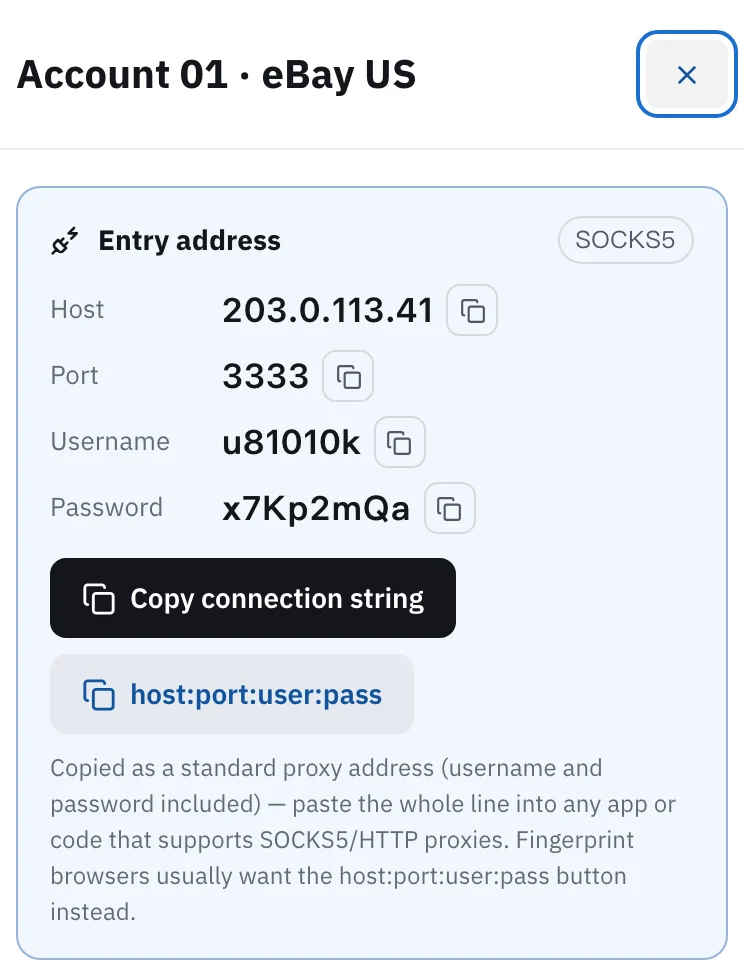
Open My assets in the Proxy302 console and click the IP for this profile. The tag next to Entry address shows its protocol, HTTP or SOCKS5. Below it are the host, port, username and password, each with its own copy button. Kameleo takes them in separate fields, so copy them one at a time.
Open Kameleo and, on the Profiles page, click New in the Your Profiles panel. In Browser Profile Name you can reuse the label you gave the IP in Proxy302, so the two are easy to match later. Choose the device, OS and browser you need.
Scroll to the Proxy row and click With Proxy. Pick HTTP or SOCKS5, the same as My assets shows. Put the host in IP or Hostname and the port in Port next to it, then the username and password in the two fields below.
Click Test Proxy. Kameleo connects to a few well-known sites through the proxy, and the last line names the city and country of the IP. The help center says one successful connection is enough to show the proxy works. If the location matches what you bought in Proxy302, click Save & Start to save the profile and open the browser. After the browser opens, Kameleo may ask for the proxy username and password a second time. Enter the same Proxy302 username and password.
Shop, social and ad accounts that stay signed in for months: buy a static ISP IP, one per profile. It does not change during the term, and a 30-day or longer term is a dedicated IP.
Scraping, price checks or viewing pages from different regions in Kameleo: use dynamic residential. It is billed by traffic, you choose the exit country, and some lines go down to state and city. The entry is proxy.proxy302.com, HTTP port 2222, SOCKS5 port 3333.
Sign up for Proxy302 through a partner link and your first top-up within 120 days gets an extra 20%, up to US$50. The bonus goes into your wallet as its own entry once the top-up arrives.
The Kameleo help center says the IP or Hostname field accepts username:password@hostname:port and splits it into the four fields. The connection string Proxy302 copies is formatted a little differently, so the reliable way is to use the four copy buttons in My assets and fill the fields one by one. It takes a few seconds.
Start with the protocol: if My assets says SOCKS5, choose SOCKS5 in Kameleo too, and use the port shown for that IP. If it still fails, copy the four fields again without extra spaces. Then check that the IP has not expired.
In the Profiles list click the three dots on the right of that profile and choose Edit, then change the Proxy row. Afterwards, Check Proxy in the same menu runs the test again.
You can set it once under Settings, Default Proxy Settings: click With Proxy and fill it in. New profiles then start with that proxy. The settings save as you type, so there is no Save button. With static IPs, remember to switch each profile to its own IP.
One static IP per profile. When several profiles share an IP, platforms can link the accounts on them.
Download and open Proxy302 Helper 2.2 and click the big 「一键加速」 (One-click boost) button. Confirm when your computer asks (Windows: Yes; Mac: your login password). Once it shows that one-click boost is on, fill in the proxy host, port, username and password in Kameleo exactly as the console shows them; settings you already entered do not need to change. Keep the helper running while you use the proxy. The helper tool guide has the full steps.
Fixed static ISP proxies: a residential-grade IP that stays the same for the whole term. For social accounts, stores and AI tools. HTTP and SOCKS5.
View options and pricingReal household IPs in 195+ countries with state and city targeting. Rotate on every request or keep sticky sessions. From US$1.50/GB, US$1.35/GB at 100 GB. HTTP and SOCKS5.
View options and pricingOfficial documentation · Confirmed on:
Official documentation · Confirmed on:
Official documentation · Confirmed on:
Official documentation · Confirmed on:
Official documentation · Confirmed on:
Official documentation · Confirmed on:
Official documentation · Confirmed on:
Official documentation · Confirmed on:
Create an account, top up once, then pick rotating residential, static ISP or datacenter IPs and have one running in your browser within minutes.