ISP proxies (static residential)
Fixed static ISP proxies: a residential-grade IP that stays the same for the whole term. For social accounts, stores and AI tools. HTTP and SOCKS5.
View options and pricing ×

Four steps put one Proxy302 IP into an ixBrowser profile. For dozens, Add in Batches imports them in one go.
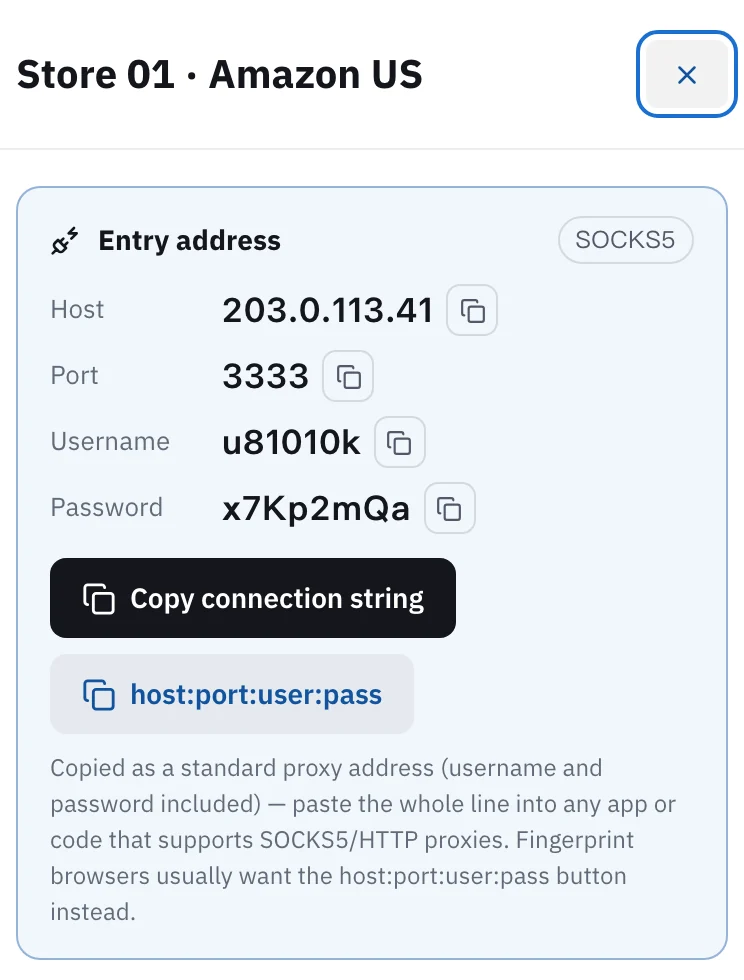
Copy the IP's connection details from My assets in Proxy302. In ixBrowser click Create Profile, open Proxy Configuration, set Proxy Method to Custom and Proxy Type to the protocol on your asset (HTTP or SOCKS5), fill in host, port, account and password, run Proxy Detection, and click Create once it passes once it passes. In bulk: Proxy Resources → Static Proxy → Batch Operations → Add in Batches, one host:port:username:password per line, with socks5:// in front for SOCKS5.
Updated:
Each ixBrowser profile has its own proxy. A profile without one uses your computer's own network.
For accounts that stay logged in: one static IP per profile, so the account always signs in from the same place.
Match the protocol: each Proxy302 static IP has one protocol, HTTP or SOCKS5, chosen at purchase. Pick the same one in ixBrowser.
Open My assets in the console and click the IP for this profile. The card shows its protocol (HTTP or SOCKS5); note it. Copy host, port, username and password one by one, or click host:port:user:pass to copy them as one line, which you will want for batch import.
In ixBrowser go to Browser Profile → Browser List and click Create Profile. Under Platform Account Configuration pick a platform and a profile title (required, must be unique), then switch to Proxy Configuration. Set Proxy Method to Custom and pick the protocol on your asset in Proxy Type: HTTP or SOCKS5 (the list also has direct mode, HTTPS and SSH).
Paste host, port, account and password into their fields. A static IP does not need IP Detection on every start, which slows down profile launch; for rotating residential you can turn it on.
Click Proxy Detection. The arrow on its right switches the check node; for an IP outside China use the global line. When it passes, the exit IP and country show in green under the button. If they match what you bought in Proxy302, click Create. ixBrowser only saves a manually entered proxy after it passes the check.
In the left menu go to Proxy Resources → Static Proxy, then Batch Operations → Add in Batches.
Format: host:port:username:password, the same line Proxy302 copies. For a SOCKS5 IP put socks5:// at the start; lines without a type are imported as HTTP. Up to 200 per batch. The 12 November release also accepts username:password@IP:port.
Run the proxy check; the results show in the list below. Then click Confirm. Proxies already in the list are not added twice.
Stores, ad accounts and social accounts, where a profile stays logged in to one account: buy a static ISP IP, one per profile. The IP does not change during the term, and a term of 30 days or more is a dedicated IP.
Scraping, price checks and looking at search results in other countries: use rotating residential. It is billed by traffic, the entry is proxy.proxy302.com, HTTP on port 2222 and SOCKS5 on port 3333. For rotating residential you can turn on IP Detection to see the exit each time a profile opens.
ixBrowser has a free plan: 100 profiles and 2 team seats, and custom proxies work on it. If you do not have an account yet, you can sign up with the link below.
New Proxy302 users who sign up through a partner link or an invite link get an extra 20% on their first top-up, up to US$50, if it comes within 120 days of signing up. The bonus goes into the wallet after the top-up arrives.
Use the protocol shown on the IP in Proxy302 My assets. Each static IP supports only the protocol chosen at purchase, and the wrong one fails the check. Rotating residential works with both: HTTP on port 2222, SOCKS5 on port 3333.
Copy the values again from My assets, without spaces. Check the proxy type and port. For an IP outside China, switch the check node to the global line and try again. Finally, check whether the IP has expired, or for rotating residential whether traffic has run out.
Yes. Custom proxies cost nothing extra. The free plan has 100 profiles, 10 profile creations and 100 profile opens a day; the API and the synchronizer need a paid plan.
They can share it technically, but they will all show the same exit. If the accounts must stay separate, buy one IP per profile.
Open the Proxy302 helper tool and click the one-click boost, and keep it on while you use the profile. Fill in the Custom proxy fields as usual.
Go through the troubleshooting guide item by item: protocol, expiry, WebRTC, and connecting from mainland China.
Fixed static ISP proxies: a residential-grade IP that stays the same for the whole term. For social accounts, stores and AI tools. HTTP and SOCKS5.
View options and pricingReal household IPs in 195+ countries; the Premium line adds state and major-city targeting. A new IP on every new connection, or keep sticky sessions. From US$1.50/GB, US$1.35/GB at 100 GB. HTTP and SOCKS5.
View options and pricingEight antidetect browsers that work with Proxy302 side by side: free plans, desktop apps, how each takes a proxy and which publish a Proxy302 guide.
Use Proxy302 from mainland China: download the free Fast Connect 2.3, click 「一键加速」 (One-click boost), and fill in your proxy details exactly as given.
Official documentation · Confirmed on:
Official documentation · Confirmed on:
Official documentation · Confirmed on:
Official documentation · Confirmed on:
Official documentation · Confirmed on:
Official documentation · Confirmed on:
Work at ixBrowser? Let's co-market: joint guides, partner-page listings and a +20% first top-up code for your users. Telegram @Proxy302_Support · partners@reply.proxy302.com
Create an account, top up once, then pick rotating residential, static ISP or datacenter IPs and have one running in your browser within minutes.