Shadowrocket switch is on, pages keep spinning
Check Is proxy via set on the static IP node? Does your current node open sites abroad on its own?
Fix Test your current node alone first; once it works, set proxy via on the static IP.
Three set-ups in three steps each (Proxy302 client, Shadowrocket, Clash) plus direct routing for Chinese sites.

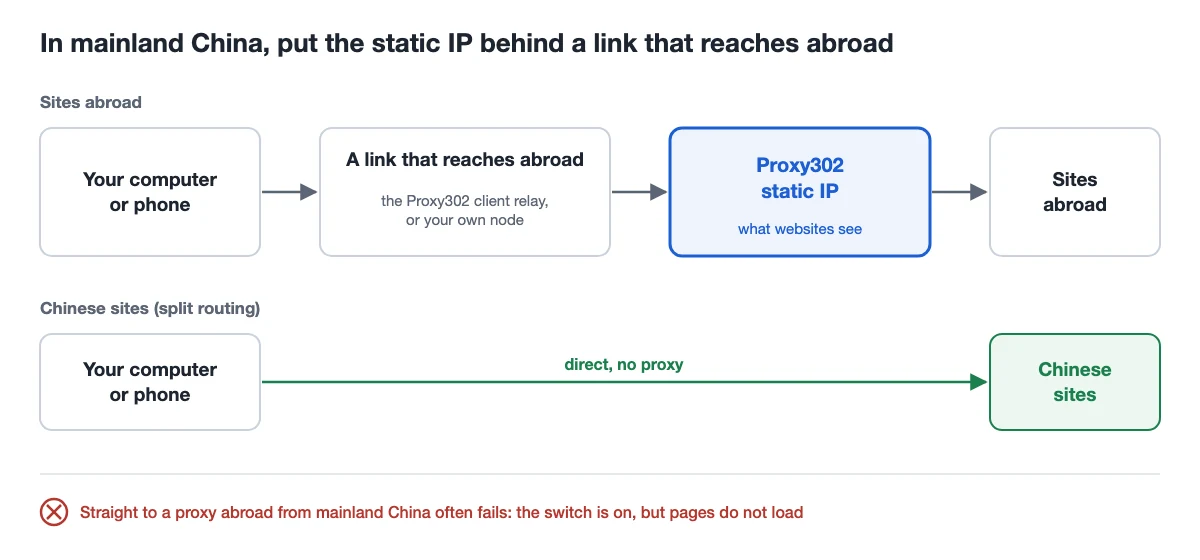
A static IP is a fixed exit abroad: websites see it instead of your own network. It does not carry you out of mainland China by itself.
From mainland China, connecting straight to a proxy address abroad often fails. That is why Shadowrocket can show the switch on and the VPN icon in the status bar while pages keep spinning.
The fix is the order: first a link that reaches abroad (the Proxy302 client relay, or a node you already use), then the static IP behind it. Chinese sites go direct and skip the static IP.
| Item | Who it suits | What you need | Chinese sites go direct by |
|---|---|---|---|
| Proxy302 client (Windows / Mac) | Computer users with no other node | Only the client, with its own relay | Turning on Chinese sites direct in Settings |
| Shadowrocket (iPhone) | iPhone users with a working node | Your current node plus a static IP node | Setting global routing to Config |
| Clash (mihomo core) | People already using Clash on a computer | Your current node plus a static IP node | A GEOSITE,cn,DIRECT rule |
Based on the Proxy302 client 3.4.8 and later, the Shadowrocket App Store description and user manual, and the mihomo documentation, checked on 17 November 2026.
Download the Windows or Mac version from the client page, sign in with your Proxy302 account and wait for the relay to connect.
Expected result My IPs lists the static IPs you bought.
In My IPs, click Open browser on the IP: the new Chrome window goes out through it. To send other browsers or the Claude desktop app through it too, click More → Use as system proxy → Turn on, then Set as this computer’s system proxy.
Expected result ipinfo.io in that window shows the static IP and the country you bought.
Before continuing Once it is the computer’s system proxy, every app that follows the system proxy goes through this IP. Turning the system proxy off or quitting the client puts it back.
In Settings, turn on Chinese sites direct: Chinese sites use your own network and the rest still use the IP. It applies to windows opened after you switch it on; if you use the system proxy, turn it off and on once.
Expected result Sites abroad show the static IP; Chinese sites open as fast as usual.
Before continuing Chinese sites then see your own network address. Leave it off for profiles that use AliExpress, Alibaba.com and similar platforms.
In Shadowrocket, select the node you already use, turn the switch on and open a site abroad in Safari. Go on only if it loads; if it does not, fix that node first, because a static IP behind a broken node will not work either. No node of your own? Put the iPhone on the same Wi-Fi as a computer and connect through Fast Connect on it, as in the mainland China section of the Shadowrocket guide.
Add the Proxy302 static IP as in the Shadowrocket guide, with the type, address, port, username and password from My assets. Then tap the ⓘ after the new node, choose your current node under the proxy-via (代理通过) setting and save.
Expected result The order is now: you → your current node → static IP → site.
On the home screen set global routing to Config, so rules send Chinese sites direct and the rest through the proxy. Select the static IP node, turn the switch on and open ipinfo.io in Safari.
Expected result It shows the static IP and the country you bought; Chinese apps and sites open as usual.
Before continuing Do not pick the option that sends everything through the proxy, or Chinese apps will also detour abroad and slow down or fail.
proxies:
  - name: "STATIC-IP"
    type: http
    server: HOST
    port: 2222
    username: "USERNAME"
    password: "PASSWORD"
    dialer-proxy: "FIRST-HOP"

proxy-groups:
  - name: "FIRST-HOP"
    type: select
    proxies:
      - "YOUR-NODE"
  - name: "PROXY302"
    type: select
    proxies:
      - STATIC-IP

rules:
  - GEOSITE,cn,DIRECT
  - GEOIP,CN,DIRECT,no-resolve
  - MATCH,PROXY302
Example only: replace HOST, USERNAME and PASSWORD with the values in My assets (HTTP port 2222; for SOCKS5 change type to socks5 and the port to 3333) and YOUR-NODE with the name of a node that works for you now. Merge these entries into your own config and leave the rest. Written from the mihomo documentation, not run in every client.
In My assets, copy the address, port, username and password of the static IP.
As in the Clash proxy set-up guide, in Clash Verge Rev or another mihomo-based client, merge the node, the two proxy groups and the three rules above into your own config, put your current node’s name in place of YOUR-NODE, save and reload.
Choose Rule mode, open ipinfo.io in a browser, then open a Chinese site.
Expected result Sites abroad show the static IP; Chinese sites skip it and open as usual.
The static IP is abroad. A Chinese site opened through it makes a round trip abroad and back, which is slower, and some Chinese sites limit what visitors from abroad can see, so they look broken.
So send only the sites abroad that need it through the static IP and let Chinese sites go direct. The split routing guide has the full set-up for the client, Shadowrocket, Clash and browsers.
Check Is proxy via set on the static IP node? Does your current node open sites abroad on its own?
Fix Test your current node alone first; once it works, set proxy via on the static IP.
Check Do the static IP node’s type and port match My assets (HTTP 2222, SOCKS5 3333)? Are the username and password complete?
Fix Copy them again from My assets and compare field by field.
Stop when Do not keep retrying until the username and password are checked.
Check Is the current node or the static IP node selected? In Clash, does the last rule point to PROXY302?
Fix Select the static IP node in Shadowrocket; check the final MATCH rule in Clash.
Check Is global routing set to send everything through the proxy? Is Chinese sites direct on in the client?
Fix Switch Shadowrocket to Config, add the direct rules in Clash, or turn on Chinese sites direct in the client and reopen the window.
Check The username or password is missing a character or has a space, or the IP has expired.
Fix Copy them again from My assets and check the IP’s status.
In mainland China, either chain it behind a node or use a boost; a direct connection does not hold. Whether you use HTTP or SOCKS5, connecting straight to the static IP from mainland China is cut off when it opens sites such as Google, and other connections often drop for the next minute or two. On a computer, use the Proxy302 client (it has its own relay) or click 「一键加速」 (One-click boost) in Fast Connect, then enter the proxy details in your browser or app; on a phone, chain the IP behind your own node with the 3 steps above.
Not on its own. A static IP is an exit abroad, not a way to get there. On a computer, install the Proxy302 client, which has its own relay. On a phone, you need a node of your own that works, with the static IP behind it; without one, put the phone on the same Wi-Fi as a computer and connect through Fast Connect on it.
Shadowrocket is iPhone only. On Android, use a Clash-style app with the mihomo core; the config is the same as the Clash example above: the static IP node with dialer-proxy pointing to your current node.
It can see that you connect to this static IP. HTTP and SOCKS5 proxy logins are not encrypted by themselves and pass through that first hop, so use a first node you trust. Websites see only the static IP.
There is one more hop, so latency is the first node’s plus the way to the static IP. A first node close to the static IP’s country is usually faster.
No, pick one. If you already use Clash, chain it as above; if you would rather not edit config, the client is simpler.
Continue with the tool you use.
Add a Proxy302 HTTP or SOCKS5 proxy to Shadowrocket on iPhone: which boxes to fill, how to switch it on, how to check your exit IP and what to do in mainland China.
Chain a static residential IP behind your existing node in Clash with dialer-proxy: the config, the test and what the first node can see.
Send mainland sites direct and only overseas sites through the proxy: Clash, ZeroOmega, Shadowrocket, a PAC file or an exception list.
Proxy302 Official Client for Windows and Mac: manage all your IPs, open a separate Chrome window per IP in one click, and buy, top up and open tickets inside the app.
Fixed static ISP proxies: a residential-grade IP that stays the same for the whole term. For social accounts, stores and AI tools. HTTP and SOCKS5.
View options and pricingSetup guides Proxy302 publishes on GitHub on the same topic:
Product observation · Confirmed on:
Proxy302 product facts, checked on 17 November: HTTP port 2222 and SOCKS5 port 3333.
Product observation · Confirmed on:
Checked against the client interface text on 17 November: Open browser and More → Use as system proxy in My IPs, Set as this computer’s system proxy, and the Chinese sites direct switch in Settings with its note (applies to windows opened afterwards).
Product observation · Confirmed on:
Tested on 18 November 2026 from a China Telecom network in mainland China: a direct connection to the static IP, HTTP and SOCKS5 alike, failed to open Google and Facebook; the connection was reset almost at once, and some other connections dropped for the next minute or two. With 「一键加速」 (One-click boost) on in Fast Connect, the same test opened every time. An earlier test on 2 November had SOCKS5 connecting; that no longer holds.
Only one region’s China Telecom network and these sites were tested; other regions, carriers and times may differ.
Official documentation · Confirmed on:
Read on 17 November 2026: the description lists a multi-level forward proxy (the Chinese description says it supports multi-level forwarding, a proxy chain) and rules by domain, domain suffix, domain keyword, IP range and GeoIP.
Third-party source · Confirmed on:
Read on 17 November 2026: tap the ⓘ after a node and choose another node under 代理通过 (proxy via); traffic then goes client > chosen node > this node > site; a proxy group can be chosen too; choosing Cancel under 代理通过 removes it.
A community manual, not the developer’s official documentation; menu wording may differ slightly between versions.
Official documentation · Confirmed on:
Read on 17 November 2026: dialer-proxy makes the current proxy connect through another proxy or proxy group; relay proxy groups are deprecated; proxy groups do not support dialer-proxy directly.
Official documentation · Confirmed on:
Read on 17 November 2026: GEOSITE matches domains in a geosite category, GEOIP matches the IP’s country, no-resolve skips DNS resolution, and MATCH goes last and matches everything else.
Create an account, top up once, then pick rotating residential, static ISP or datacenter IPs and have one running in your browser within minutes.