Automation and API
Rotating residential IPs for scraping, price checks and rank tracking; fixed datacenter IPs for tests, monitors, API jobs and AI agents.
 ×

Create an API key in Proxy302, install the plugin in Dify and paste two values. Your workflows can use it right away.
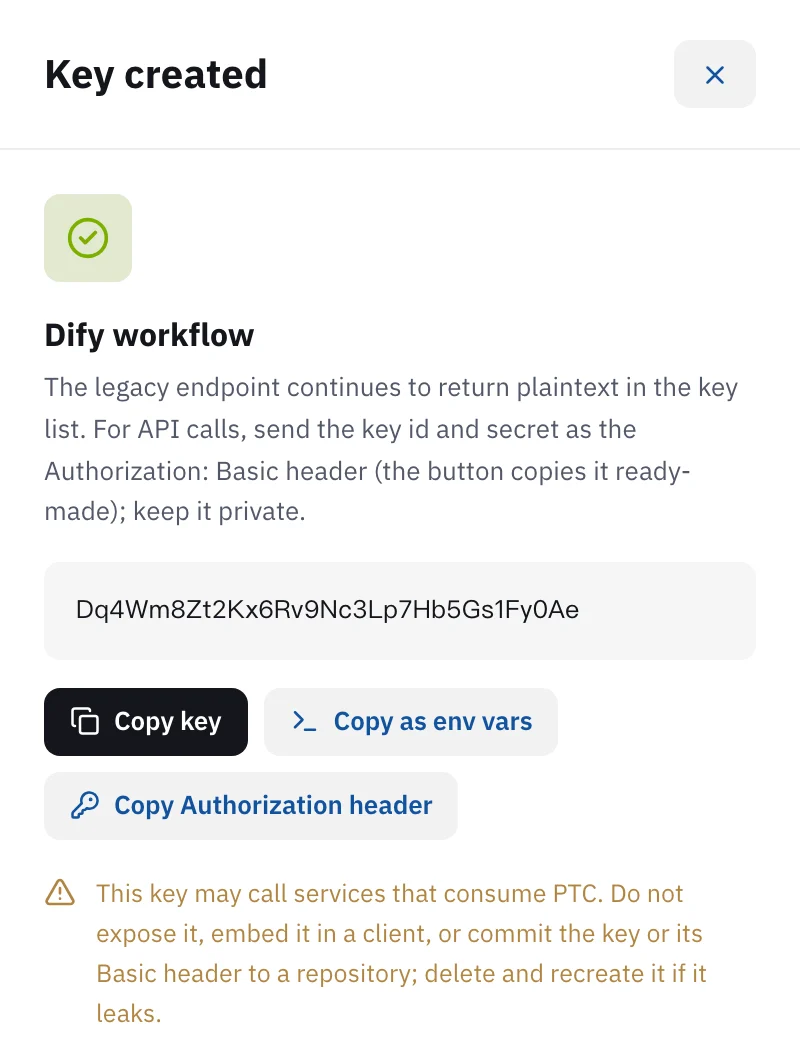
In the Proxy302 console, open API keys and click Create key. Give it a name you will recognise, such as "Dify workflow". In the Key created panel, click Copy as env vars to get two values: PROXY302_KEY_ID and PROXY302_KEY_SECRET. In Dify, open Integrations, find Proxy302 in the Marketplace and install it. When you authorize it, paste the two values into Key ID and Key secret. Saving makes one read-only call to check the key. Then add Proxy302 tools to a workflow or an agent. The plugin never places orders or creates proxies: to fetch pages or get a rotating residential proxy, buy traffic and create one rotating residential proxy in the console first.
Updated:
Dify is an open-source platform for AI apps and workflows. The Proxy302 plugin brings 7 tools from the Proxy302 open API into Dify, so workflow tool nodes and agents can call them.
Two common uses. An agent checks whether a country offers city targeting, gets one of your existing rotating residential proxies in that country and hands it to the next node. Or a workflow uses Fetch a web page through my proxy to pull a public page as Markdown and pass it to a model to summarise or extract data.
The plugin only reads your account. It never places orders, tops up or creates proxies. Of the 7 tools, only fetching a page uses your rotating residential traffic.
Open API keys in the left menu of the Proxy302 console and click Create key at the top right. Give it a name you will recognise, such as "Dify workflow". The Key created panel opens. Click Copy as env vars and your clipboard holds two lines: PROXY302_KEY_ID and PROXY302_KEY_SECRET. You can open the key from the list later to copy them again.
In Dify, open Integrations, go to the Marketplace, search for Proxy302 and click Install. A self-hosted Community Edition installs it the same way, as long as the server can reach the Marketplace. The workspace owner or an admin has to do the install. The plugin page: https://marketplace.dify.ai/plugin/proxy302/proxy302
After installing, authorize Proxy302 under Integrations > Tools, or fill it in from the tool settings of a workflow node. Paste the PROXY302_KEY_ID value into Key ID and the PROXY302_KEY_SECRET value into Key secret. Both fields hide what you type, and pasting the quotes along with the value is fine: the plugin strips them. Saving makes one read-only call to check the key. If it says the key is invalid, copy the values from the console again.
In a Workflow or Chatflow, add a tool node, find Proxy302 and pick the tool you need. In an Agent node or Agent app, add Proxy302 tools to the tool list. Each parameter is described in the node. A country, for example, can be a name or an ISO code.
Account, traffic balance and usage: the account behind the key, wallet balance (PTC), remaining traffic, and traffic used per day over the last few days.
List countries, and List states or cities: the countries, states and cities you can target, with their ids.
List products and plans: the proxy products and static IP plans. Prices are on the pricing page.
Get a dynamic residential proxy: returns one of your existing rotating residential proxies for a country. It never creates one. The password is masked unless you turn on Include password and connection URL.
List my proxies and static IPs: the proxies and static IPs on the account, with passwords masked.
Fetch a web page through my proxy: requests a public http or https page through one of your own rotating proxies, optionally exiting in a given country, and returns Markdown, plain text or raw content. It does not run JavaScript and it uses your proxy traffic.
To look up the account, countries and plans, an API key is enough, and it costs nothing.
To fetch pages or get a rotating residential proxy, the account needs rotating residential traffic and at least one proxy created from it. Rotating residential starts at US$1.50/GB and the traffic never expires. Choose the country and protocol (HTTP or SOCKS5) when you create the proxy in the console.
New users who sign up for Proxy302 through a partner link or an invite link get an extra 20% on their first top-up, up to US$50, if it comes within 120 days of signing up. The bonus is credited to the wallet as its own entry after the top-up arrives.
Check that the two values are not swapped: Key ID takes PROXY302_KEY_ID, Key secret takes PROXY302_KEY_SECRET. Then open the key in the console and use Copy as env vars again. If the key was deleted, create a new one.
The plugin is free. Looking up the account, countries, plans and proxy lists costs nothing. Fetching a page goes through your own proxy and is billed by the traffic it uses, the same as any other proxy use.
The plugin does not create proxies. Create a rotating residential proxy for that country in the console first, with the same protocol you chose in the node, then run the node again.
No. It returns what the server sends. Only public http and https URLs are accepted. Private network addresses and URLs with a username and password in them are refused.
Yes. We tested the install and all 7 tools on Dify Community Edition 1.18.0. The server needs to reach the Marketplace and proxy302.com.
The key is stored in Dify's credentials. The plugin's output and logs never show the key or proxy passwords. When you stop using it, delete the key in the Proxy302 console and it stops working at once.
Rotating residential IPs for scraping, price checks and rank tracking; fixed datacenter IPs for tests, monitors, API jobs and AI agents.
Real household IPs in 195+ countries with state and city targeting. Rotate on every request or keep sticky sessions. From US$1.50/GB, US$1.35/GB at 100 GB. HTTP and SOCKS5.
View options and pricing302.AI is a pay-as-you-go platform for AI models and apps built by the same team as Proxy302. See how to pair the two for geo-testing, scripted API calls and AI-agent networking.
Official documentation · Confirmed on:
Official documentation · Confirmed on:
Official documentation · Confirmed on:
Create an account, top up once, then pick rotating residential, static ISP or datacenter IPs and have one running in your browser within minutes.