
[ProxyReviewHub] Proxy 302 Review: An In-Depth Guide
Updated 18 October 2026 by Proxy302: this review was written by Emma from proxyreviewhub in January 2025, and some details have changed. We removed details that no longer apply or that we cannot confirm; notes in square brackets are ours, not the reviewer’s. There is no free trial; the smallest purchases are 1 GB of rotating residential traffic or one IP for one day. Rotating residential proxies charged by IP and datacenter IPs charged by traffic are paused. Current prices are on the pricing page.
Author: Emma from proxyreviewhub
Proxy 302 is a versatile and reliable proxy service, ideal for tasks like web scraping and market research. With a global network and user-friendly features, it stands out as a top choice for diverse online needs. This guide provides an in-depth look at its standout features, pricing plans, and step-by-step instructions for seamless integration and usage.
What is Proxy 302?
Proxy 302 is a proxy service provider that deals in residential proxies, thus guaranteeing users quality and ethical IPs for various tasks online. Some of the activities that can be performed with the help of proxies are data extraction, web crawling, market analysis, and watching geo-restricted content.
Proxy302 Overview
Types of Proxies:
Dynamic Residential Proxies: These IP addresses dynamically switch at a given time interval, suitable for tasks that need high anonymity—charged at $5 per GB. [Proxy302 note: US$5/GB is the Premium line; the Budget line costs less, and per-IP billing is paused. Current prices are on the pricing page.]
Static Residential Proxies: These proxies stay fixed for the whole lease, perfect for long-term use without changing the IP and charged at $0.50 per day or $7.99 per month.
Static Data Center Proxies: These proxies are from data centres and are more suitable for tasks requiring high performance and speed. Charged at $0.25 per day or $3.99 monthly.
Additional Features:
Free Chrome Proxy Extension: Simplifies proxy management directly in your browser.
Supports HTTP and Socks5: Enhanced flexibility for various tasks.
Proxy302 APP: Access the global network with the Proxy302 app on iOS and Android.
How to Use Proxy 302: A Step-by-Step Guide
Now that we’ve gone through the preliminaries, we must examine how Proxy 302 works. Here is how you can begin using Proxy 302, a step-by-step guide.
Step 1: Setting up your Proxy 302 Account
Log into your dashboard and then sign up for the service on the website. Here, you can manage your balance, select proxies and buy credits. USDT, USDT / Alipays, and Alipay are accepted as payment methods.
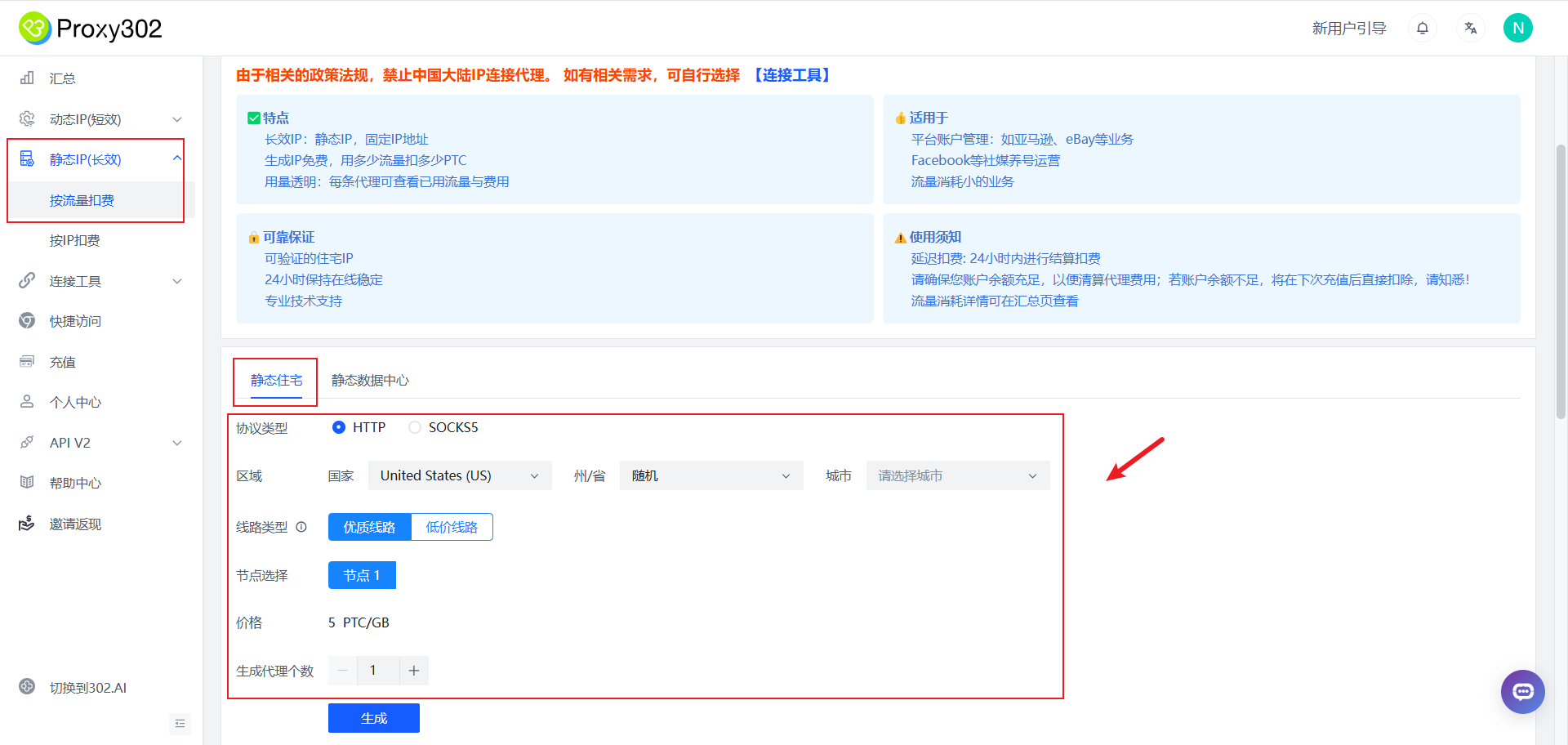
Step 2: Purchasing Proxy IPs
From the dashboard, view and purchase proxy credits. Choose between dynamic, static residential, or static data centre proxies. Follow these steps:
- Top Up Your Balance: Add credit by clicking the Top Up link. For instance, depositing $5 gives you 5 PTC.
- Select Proxy Type: Choose between dynamic residential, static residential, or static data centre proxies.
- Choose Your Region: Select proxies by country (e.g., United States, United Kingdom, Germany).
- Complete the Purchase: Finalize your order; billing will reflect your selection.
Step 3: Creating and Managing Proxies
Proxy 302 will assign a new IP address for each proxy. The dashboard displays:
- IP Address
- Port
- Username and Password (if needed)
Copy these details so you can use the proxy as needed.
Step 4: Speed Testing Your Proxy
Check your proxy’s speed by clicking the Start Speed Test button. This ensures the proxy is suitable for your needs.
Step 5: Usage of the Proxy in Browser or Application
To use Proxy 302, integrate it into compatible tools like anti-detect browsers (e.g., Multilogin, GoLogin) or automation frameworks (e.g., Puppeteer, Selenium). You can also configure proxies directly in proxy-enabled browsers or software.
Add Your Proxy Details: You enter the IP address, port, username and password in the browser or application settings.
Test the Connection: Verify functionality by using the Check Connection button.
Step 6: Dealing with Many Proxies for Varying Purposes
Create profiles for different tasks (e.g., Google Ads, Meta Ads). For each profile:
- Create a Profile: Set a type, name, and tags.
- Set Profile Settings: Add specific login details or targeted sites.
Step 7: Long-Term Proxy Use
[Proxy302 note: static IPs are leased for 1, 3, 7, 30, 60 or 90 days. Auto-renew is optional and set per IP: switch it on in My assets (new purchases start with it off), or renew by hand there before the end date.]
Conclusion
Proxy 302 is a versatile, customizable, and user-friendly proxy service. It provides residential and data centre proxies for web scraping, market analysis, and more. With unlimited traffic, global reach, fast connections, and a pay-as-you-go pricing structure, Proxy 302 is one of the best proxy solutions available. It offers tools and support for both short-term tasks and long-term projects, ensuring transparency and reliability. [Proxy302 note: traffic is not unlimited; rotating residential traffic is bought by the GB.]
👉 Register and top up 👈 [Proxy302 note: the smallest purchase is 1 GB of rotating residential traffic on the Budget line (US$1.50) or one IP for one day (from US$0.25).]
FAQs
1. What types of proxies does Proxy 302 offer, and how much do they cost?
Proxy 302 provides dynamic residential proxies, static residential proxies, and static data center proxies to cater to various needs. Dynamic residential proxies, ideal for tasks requiring frequent IP changes, are priced at $5 per GB. Static residential proxies, perfect for consistent long-term use, cost $0.50 per day or $7.99 per month. Static data center proxies, known for high performance and speed, are available at $0.25 per day or $3.99 per month. [Proxy302 note: US$5/GB is the Premium line; the Budget line costs less, and per-IP billing for rotating residential proxies is paused. Current prices are on the pricing page.]
2. How do I get started with Proxy 302?
To begin using Proxy 302, create an account and log into the dashboard to manage your balance and purchases. Top up your account using USDT, USDT / Alipays, or Alipay, and select your preferred proxy type and region. Once purchased, you’ll receive IP details, including the address, port, username, and password, which you can configure in compatible browsers or applications for immediate use.
3. What makes Proxy 302 stand out from other proxy providers?
Proxy 302 offers standout features like a flexible pay-as-you-go model with no subscription requirements. With a global network of over 65 million IPs and support for HTTP and Socks5 protocols, Proxy 302 also includes tools like a free Chrome extension and mobile app for seamless proxy management. [Proxy302 note: there is no free trial; the smallest purchases are 1 GB of rotating residential traffic or one IP for one day. Rotating residential IPs cover 195+ countries and regions.]