
DeepSeek Down? Try These Fixes + How Proxies Can Help
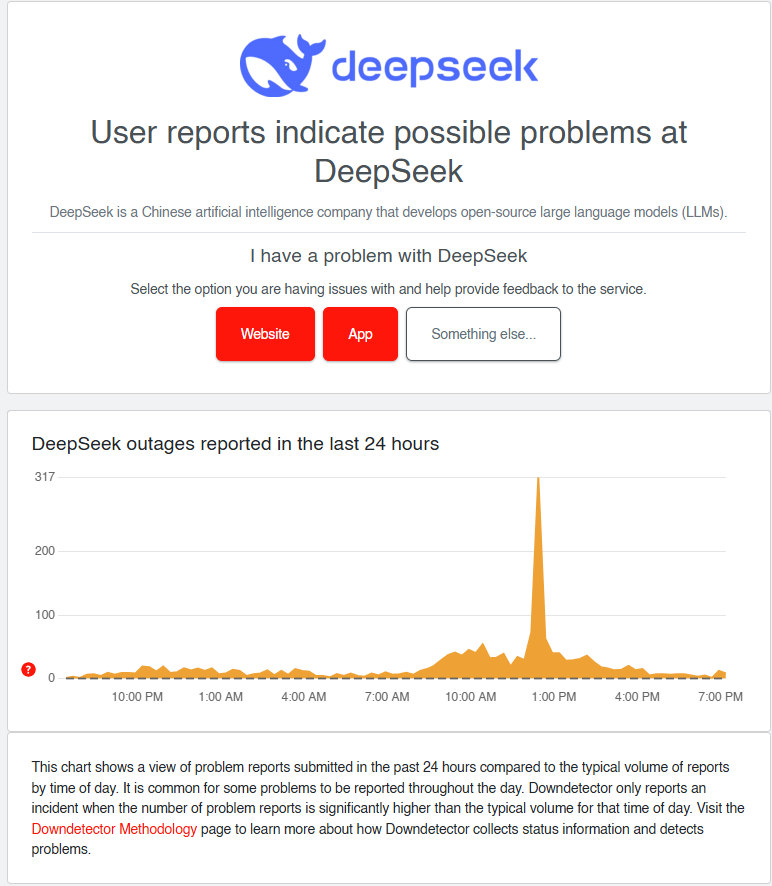
You’re racing to finish a project, and suddenly—Deepseek slams the door. “Server busy. Please try again later.” Sound familiar? You’re not alone. Server overloads plague platforms like Deepseek during peak hours, throttling productivity for developers, researchers, and businesses. But what if you could dodge these roadblocks entirely?
In this guide, we’ll unpack 5 proven fixes for Deepseek’s server errors, with a spotlight on Proxy 302—a game-changer offering 65M+ IPs globally, city-level targeting, and a flexible pay-as-you-go model (no rigid subscriptions!). Let’s turn frustration into action.
Why Does Deepseek Show “Server Busy” Errors?
Before diving into fixes, let’s decode why this happens:
- Traffic Overload: Deepseek’s servers crack under high demand since late January. On Friday, January 24, 2025, the site drew 6.2 million visits in a single day, according to Similarweb.
- Regional Restrictions: Your location might be deprioritized during congestion.
Countries that have banned or restricted DeepSeek AI:
India: The Ministry of Finance has banned the use of DeepSeek by its employees. The central government has prohibited its employees from using AI tools and applications such as DeepSeek and ChatGPT on office computers and devices.
Italy: Was one of the first countries to ban DeepSeek AI over concerns about the handling of user data and compliance with EU data protection laws. The Italian Data Protection Authority (DPA) investigated DeepSeek’s data collection practices and removed the AI platform from app stores in the country.
Taiwan: Has banned the use of DeepSeek AI across all public sector organisations, including public schools, state-owned enterprises, and critical infrastructure. The Ministry of Digital Affairs cited concerns about cross-border data transmission and information leaks as the reason for the ban.
Australia: The Australian government has banned its employees from using the DeepSeek AI chatbot on government devices. Home Affairs Minister Tony Burke stated that a national intelligence assessment found the AI platform to pose an unacceptable security risk.
South Korea: The defence ministry has blocked DeepSeek from accessing its internet-connected military computers. This action was taken after the country’s personal information protection commission requested clarity on DeepSeek’s management of user information.
United States: The American Navy has restricted the use of DeepSeek, and Texas was the first state to ban the Chinese AI app. Several federal agencies have instructed employees against accessing DeepSeek, and “hundreds of companies” have requested their enterprise cybersecurity firms to block access to the app.
- IP Throttling: Rapid retries flag your IP as suspicious or spam behaviours, worsening access.
For data-heavy platforms like Deepseek, server overloads mean lost time, revenue, and sanity.
5 Fixes for Deepseek’s “Server Busy” Error
Fix 1: Retry Strategically—Patience Pays
“Just refresh!” sounds obvious, but timing matters.
- Wait 5–10 minutes: Servers often clear queues quickly.
- Avoid rapid clicks: Aggressive retries trigger IP bans.
Pro Tip: Use a timer app to remind you—set it and forget it!
H3: Fix 2: Check Deepseek’s Server Status
Before blaming your Wi-Fi, verify if the issue is systemic.
- Visit Downdetector: Real-time outage maps reveal if others are struggling.
- Deepseek Status Page: Some platforms share live server health (if available).
H3: Fix 3: Leverage Third-Party Integrations (Nvidia, OpenRouter, etc.)
Nvidia logo displayed on a smartphone screen on December 10, 2024. Inset: DeepSeek logo displayed on a smartphone screen on January 28, 2025. VCG/VCG via AP
If direct access to Deepseek is blocked, third-party platforms that integrate with its API can be lifesavers. Companies like Nvidia and OpenRouter act as middleware, offering optimized routes to Deepseek’s services while reducing server strain.
Why Use Third-Party Platforms?
User Story: A content agency using OpenRouter maintained productivity during Deepseek’s 2025 server meltdown by switching seamlessly to Mistral-7B.
Distributed Load: These services spread requests across multiple endpoints, lowering Deepseek’s server pressure.
Built-In Redundancy: If one server fails, they reroute traffic automatically.
Enhanced Features: Some add extra tools like analytics or multi-model access.
Example 1: Nvidia’s AI Integration
Nvidia’s APIs often partner with platforms like Deepseek to deliver scalable AI solutions.
How It Helps:
Nvidia’s infrastructure handles traffic spikes, reducing “server busy” risks. Optimized GPU resources speed up Deepseek tasks like model training.
Example 2: OpenRouter’s Unified Gateway
OpenRouter aggregates access to multiple AI models, including Deepseek, through a single API. And you can use the Deepseek R1 free version at the browser immediately just like the official site.
Benefits:
Automatic failover: If Deepseek is busy, OpenRouter redirects requests to alternatives like Claude or Llama.
Simplified billing: Pay once for multi-platform access.
Fix 4: Use Proxy 302’s Premium Proxies
When all else fails, a proxy can help if the problem is tied to your IP or region, because it gives you a different one. Here’s why Proxy 302 shines:
Why Proxy 302?
- 65M+ Global IPs: Tap into residential IPs from 195+ countries and regions to avoid overcrowded servers.
- City-Level Targeting: Need an IP from Dallas or Tokyo? Pinpoint locations to match Deepseek’s least busy regions.
- Pay-As-You-Go: No monthly lock-ins—buy 1GB or 100GB based on your needs.
- Sign Up: Create a Proxy 302 account here.
- Choose Residential Proxies: Opt for city-level targeting.
- Integrate: Use Proxy 302’s API or browser extension to route traffic.
Fix 5: Schedule Tasks During Off-Peak Hours
Timing is everything.
- Late nights/early mornings: Fewer people are online, so the servers are usually less busy.
- Use automation tools: Schedule Deepseek queries for 2 AM—while you sleep!
How Proxies Prevent Future “Server Busy” Errors
Think of Proxy 302 as your VIP backstage pass to Deepseek. Here’s how it works:
- IP Rotation: Cycle through 65M+ IPs to avoid throttling.
- Geolocation Flexibility: Access servers from less congested regions.
- Residential Authenticity: requests come from real home connections.
Example: An E-Commerce Analytics Firm Cuts Downtime
A UK firm that collects Deepseek market-trend data and keeps hitting “server busy” errors can spread its requests over city-level residential IPs and run them outside peak hours.
Result: fewer interrupted requests, because no single IP carries all of the traffic.
Cost: with pay-as-you-go it pays only for the traffic it uses, for example 15 GB in a month, with no subscription.
Conclusion: Stay Ahead of Server Chaos
Deepseek’s “server busy” error isn’t a dead end—it’s a detour. With tactics like strategic retries, 3rd party service providers, and Proxy 302’s powerhouse proxies, you’ll turn downtime into productivity.
Ready to End Server Errors? Get Started With Proxy 302!
Don’t let Deepseek’s hiccups derail your workflow. 👉 Register and top up 👈 with Proxy 302 today. The smallest purchase is 1 GB of rotating residential traffic on the Budget line (US$1.50) or one IP for one day (from US$0.25).